There is a new Indonesian song that I like, called “Dawai”
(which means "strings" in Indonesian), originally performed by Fadhilah Intan, and composed by Hendro Djasmoro and Albert Juwono, which has been making its rounds in social media -- not only in Indonesia but also in neighbouring countries, especially Malaysia. This song is being used as the original soundtrack for an Indonesian movie called “Air Mata di Ujung Sajadah” (or “Tears at the Edge of the Praying
Mat”).
This song is very popular in Malaysia and has been covered
by many Malaysian singers, leading to people thinking that this is a Malaysian
song. In fact, this is an Indonesian song, if you notice, the lyrics are
Indonesian and not Malay. Many of our Malaysian friends got confused with the lyrics:
“Dawai yang telah lama kupetik” – how wires (“dawai” in Malay) can be plucked
(dipetik). Dawai in Indonesian means “strings”, which usually refer to the
guitar strings, that can be plucked (or strummed) when the guitar is being
played.
Below are the full lyrics of the “Dawai” song – in Indonesian,
and its English translation.
Dawai (“Air Mata Di Ujung Sajadah” OST)
Tujuh tahun sudah, kau buatku percaya Dengan keyakinan yang semu membiru Tenggelamku dalam sebuah kepalsuan Yang kau rajut untuk membalut malu
Reff:
Dawai yang telah lama kupetik Sumbang dan terus lirih berpekik Doa yang pernah ku ucap Surga tak menjawab Betapa sungguh tega oh hatimu Mencuri yang digariskan untukku Hati yang dulu terluka Dirundung dilema
Mencoba 'tuk paham, namun sulit maafkan Iman yang kugenggam kini pun tenggelam Di palung lautan kini t'lah kutemukan Secercah harapan yang lama t'lah hilang
Kembali ke Reff
English translation:
Strings (“Tears at the Edge of the Praying Mat” OST)
It's been seven years, you made me believe With confidence, that is fake and turning blue I am sinking deep into a fakeness The one you knit to cover your shame
Chorus:
The strings I have been plucking for a long time Out of tune and continued to scream softly The prayer I once said Heaven does not answer So heartless, oh your heart Stealing what was destined for me A heart that used to be hurt Plagued by dilemma
Trying to understand, but it's hard to forgive The faith I hold is now sinking In an ocean trench, now I have found A glimmer of hope, the old one is gone
The smart country girl from ‘Pachinko’ returned as a genius girl in ‘The Kidnapping Day’. 12-year-old child actress Yuna is already an experienced actress in her 7th year of acting. In the ENA Wednesday-Thursday drama 'The Kidnapping Day', she vividly played the role of Ro-hee, a girl who became a genius after undergoing a brain experiment but lost her memory.
'The Kidnapping Day' is a drama centered on the chemistry between Ro-hee and the clumsy kidnapper Myeong-jun (played by Yoon Kye-sang) who kidnapped her. The story revolves around the relationship and narrative between the two people. Usually, child actors portray the protagonist's childhood as supporting roles, but in this drama, Yuna took on the challenge of acting as the female lead role throughout the whole drama. As a result, she naturally developed a '(fake)-father-daughter' chemistry with adult actor Yoon Kye-sang, and was reborn as a true hit star.
Although she is still young, acting is already a part of Yuna's life. She has never had any other dreams other than being an actress, and has faithfully followed her single path. Is that the reason why (her acting is amazing)? Yuna played the difficult character of a genius girl who looks 'cocky' (arrogant/bratty) on the outside but is lonely in the inside, and she did it 'cleverly' (brilliantly), as the public said. This was an achievement because she did not limit herself to the limitations of being a child actress.
The following is a Q&A written interview with Yuna.
Q: You became known by playing the role of a young Sunja in the Apple TV+ series ‘Pachinko.’ I think you have established yourself as a child actor who can be completely trusted through this ‘The Kidnapping Day.’
A: I am truly grateful. I like it because I wanted to express Rohee well. While reading the script, I cried a lot because of Rohee. This is my first time acting in such a large part, and I was nervous and felt a lot of responsibility. It was fun.
Q: It must have been difficult because there wasn't much difference in appearance or amount of lines (for your role as Ro-hee) compared to adult actors, but there were a lot of good reviews. I'm curious as to whether you expected this to happen and what thoughts you had as you watched the reactions. Is there a memorable compliment?
A: I didn't expect it (the compliments and good reviews) at all. I just worked hard and had fun, and I hoped that many people would love this work. Thank you very much. I had friends who asked me for spoilers because they thought it was so fun, and what I remember most is when someone asked me for an autograph, saying that he liked me. It was more fun than difficult. I tend to try to have fun doing everything, and I think this is the secret.
Q: Rohee is a genius girl character who has lost her memory, and the setting is fantasy-like. Nevertheless, it doesn't seem to be awkward (for you) at all, and you acted in a way that blended well into the character, so I think that (awkward) barrier disappeared. How did you do it?
A: Rohee is an 11-year-old girl. However, due to the greed of adults, she was trapped in the fence of experimentation. In order to be able to express these characteristics, I tried to express Ro-hee, who has a cold and rude way of speaking, but gradually changes as she receives sincere care when she meets a good adult like Myeong-jun, and despite of the fear inside her, Ro-hee eventually opens up her heart to Myeong-jun.
Q: How was your relationship on set with actor Yoon Kye-sang, who plays Myeong-jun, the ‘good kidnapper and fake-dad’? If you have any memorable episodes, please tell us.
A: He (Yoon Kye-sang) gave me a lot of advice on acting. I feel very fortunate and lucky to have been with actor Yoon Kye-sang when I was performing such a large role for the first time. It was really nice that he was considerate so that I could act comfortably. He's the best uncle. Even as I speak, I miss my uncle (Yoon Kye-sang) now. We still keep in touch these days, and I was touched that he came to see my first performance in the (Sea Village Diary) theatre play.
Q: From the beginning, the character was like a 'cheeky child' and spoke informally (in banmal or casual) to actor Yoon Kye-sang. Were there any concerns that he might come across as 'obnoxious' (distateful)? Even though he was a character with a strong personality, I think that balance was struck well.
A: There were no good adults for Rohee. So in the beginning, she is a little strange, like a cold, spoiled, socially-inept child. But that changes when she meets Myeongjun, a good adult. I understood this character as ‘Rohee is a warm child, but the environment in which she grew up was not.’ So I wanted to express that part well. Although it looks cold and spoiled, I wanted to express the pure and warm heart of a child, not in a strange way.
Q: I know you debuted at the age of 5, and you have already been an actress for 7 years. It must be quite difficult to handle both your studies and acting. Is there a reason why you want to continue acting? I'm also curious about what kind of work you'd like to do if you weren't acting.
A: I think the appeal of acting is that we can live in many characters. That’s why acting is fun. I’ve never thought of any other jobs other than acting! If I don't act... I really don't know (what would I do). I really like acting.
Q: Both young Sunja (in Pachinko) and Ro-hee (in The Kidnapping Day) seem to play many characters with complex emotions and narratives as adults. As an actor, what kind of charm do you want to show in the future?
A: I found those characters interesting, so I had a desire to express them well through acting. I still want to try many different things! I hope people will always be curious about my acting and look out for the next projects I will appear in. I also want to become an actress who can have a positive influence on other people.
A kidnapper, a detective, and a kidnapped child. Their combination is by no means unusual. This kidnapper, Kim Myeong-jun (Yoon Kye-sang), goes to great lengths to protect the young girl he kidnapped, Choi Ro-hee (Yuna). Even though he has no choice but to engage in a continuous chase with detective Park Sang-yoon (Park Seong-hoon), who has been chasing them, he heartily says, “I’m sorry.” Detective Park Sang-yoon, who pursues them, eventually understands the kidnapper, Kim Myeong-jun, even as he tries to arrest him. The detective, who tries to look into the actual truth of the case, sees that their relationship is not simply that of a kidnapper and a kidnapped child, even when everyone else assumes that Kim Myeong-jun is a dangerous kidnapper.
The same goes for Ro-hee, the kidnapped child. Ro-hee, who is a genius and is excellent at understanding and responding to situations, actually controls Kim Myeong-jun, who kidnaps her. At the same time, she realizes that Kim Myeong-jun is the only adult who can protect her, resulting in her relying on him for protection and care. This is why the sight of them gathering in one place and collaborating cannot be ordinary. This scene contains a message full of satire that the ENA Wednesday-Thursday Korean drama throws through this special combination. That is a sharp criticism of a world without true adults.
‘The Kidnapping Day’ is based on the story of heartless adults who have sacrificed children for a secret research called the 'Genius Child Project'. Ro-hee was a child who was being used as an experimental subject by her father for the research, and she is a successful “product” of the research. However, Ro-hee's parents were murdered, and Ro-hee, who escaped from the house with no memory, was kidnapped by Kim Myeong-jun, a clumsy kidnapper who was trying to kidnap her. But in reality, he saved her.
The drama traces who murdered Ro-hee's parents and what happened to Ro-hee, showing that some force behind this project supports it. They include people like Jayden (Gam Young-seok), an overseas investment manager who wants to make a lot of money, and Dr. Mo Eun-seon (Seo Jae-hee), who supported this research for her developmentally delayed daughter. They try to kidnap Ro-hee, the successful “product” of the research, as well as find her father’s research report so they can make more genius children like Ro-hee. As a result, Kim Myeong-jun and Ro-hee, who have gradually become closer and form a paternal bond just like father and daughter, run away from their pursuit.
And finally, the true identity of Kim Myeong-jun's wife, Seo Hye-eun (Kim Shin-rok), who was hidden behind all these incidents, is revealed. She grew up in the same orphanage as Kim Myeong-jun and was adopted in place of Kim Myeong-jun by the family that was conducting research for the 'Genius Child Project'. Kim Myeong-jun was originally intended to be adopted, but Hye-eun hid in the car’s trunk to follow him. She managed to get adopted by changing the IQ test paper. However, Hye-eun was eventually dismissed because she failed to achieve results, and decided to manipulate this incident for her revenge.
This points out the difference between a crime that occurs outside the law, such as kidnapping, and a crime that takes place through a legal procedure called adoption but is terminated because it does not serve a specific purpose. In the end, doesn't either side view the child as a purpose rather than as a child? The irony of Kim Myeong-jun, a clumsy kidnapper who just wants Ro-hee, an 11-year-old girl, to be happy like an ordinary child of her age, becomes the opposite of them and becomes the child's only protector, and this critical and satirical point of view is reflected in it.
To put it conversely, this also indirectly shows what kind of situation a person who only wants a child to be happy is pushed into in this calculating, self-interested world without true adults. Kim Myeong-jun ends up being chased by the actual kidnappers. The same goes for an impartial detective like Park Sang-yoon, who tries to understand the truth of the case and protect the child until the end. Despite pressure from his superiors not to investigate further, he continued the investigation and ended up being suspended.
Kim Myeong-jun just happens to become a kidnapper, and Park Sang-yoon is a detective who is no longer able to use his power because he’s suspended. The sight of them working together and fighting to protect a young girl named Rohee makes the drama viewers cheer because they seem like the only real adults left. However, the fact that they are paying a heavy price to protect such innocence is, on the one hand, bittersweet. What a society that can't make even one child happy. Metaphorically speaking, isn't it a distorted self-portrait of our society that pushes people into ruthless competition to make them elite from a young age?
Note: You may watch “The Kidnapping Day” on Amazon Prime. At the time of writing, it has aired 10 out of 12 episodes on Wednesdays and Thursdays at 10:30 p.m. Singapore time, with the last episode scheduled to be aired next week.
I would recommend you to watch this drama. It’s a combination of multiple genres: drama, light comedy, suspense, mystery, family values, emotion and moral values mixed into one. The chemistry between the kidnapper and the kidnapped girl is particularly sweet, with great performances from both actor Yoon Kye-sang and the very talented child actress Yuna.
According to an advice from a cPanel engineer, the best way to move MySQL data folder to a different folder (e.g. on a different partition with more available disk space) on a cPanel / CentOS environment is to create symbolic link rather than modifying the my.cnf file.
Presuming that the original MySQL data folder is located on /var/lib/mysql and the partition with more available disk space is mounted as /home, these are the steps on how to move the MySQL data folder from /var/lib/mysql to /home/var_mysql/mysql.
1. Backup the whole MySQL database, just in case.
mkdir /home/backup (if it doesn't exist yet) mysqldump --all-databases | gzip > /home/backup/alldatabases.sql.gz
2. Stop MySQL service and verify that it's stopped.
/etc/init.d/mysql stop /etc/init.d/mysql status
3. Create destination folder, move the folder and all the files and subfolders from existing to new destination folder, change permission settings and create symbolic link.
I upgraded Ceph from the old Dumpling version to the latest Jewel version. In addition to the OSDs not able to start up due to some permission settings on /var/lib/ceph (we need to change the permission settings recursively to ceph:ceph), I am also having this HEALTH_WARN messages:
indra@sc-test-nfs-01:~$ ceph status cluster d3dc01a3-c38d-4a85-b040-3015455246e6 health HEALTH_WARN too many PGs per OSD (512 > max 300) crush map has legacy tunables (require bobtail, min is firefly) crush map has straw_calc_version=0 monmap e3: 3 mons at {sc-test-ceph-01=192.168.3.3:6789/0,sc-test-ceph-02=192.168.3.4:6789/0,sc-test-nfs-01=192.168.3.2:6789/0} election epoch 50, quorum 0,1,2 sc-test-nfs-01,sc-test-ceph-01,sc-test-ceph-02 osdmap e100: 3 osds: 3 up, 3 in pgmap v965721: 704 pgs, 6 pools, 188 MB data, 59 objects 61475 MB used, 1221 GB / 1350 GB avail 704 active+clean
To resolve the problem is very simple, use below command:
Today (25 July 2014) is System Administrator Appreciation Day, which is an event to show appreciation for the work of system administrators (or sysadmins) and other IT workers. It is celebrated on the last Friday of July every year, since the year 2000.
As a hardened, 15-year veteran system and network administrator, I
know first hand about the many tasks a system administrator needs to do,
the skill sets and knowledge he needs to learn, and with the daunting
tasks and long hours he has to keep. Yet sometimes, normal users would
not know their system administrators as well as the system
administrators know their users. And that is why System Administrator
Day is an awesome day that everyone should celebrate.
Treat your system administrator today, because 25 July is World System Administrator Appreciation Day
What do system administrators do, and why do we need to appreciate their work? According to Wikipedia‘s
definition, a system administrator is a person who is responsible for
the upkeep, configuration, and reliable operation of computer systems;
especially multi-user computers, such as servers.
In layman’s terms, system administrators manage all the servers,
network equipment and any other IT infrastructure for an organisation.
In many companies, those system administrators are part of the
organisation’s IT team or department. They are the one who setup the
network within the organisation, installing mail servers, file servers
and many other servers required by the organisation, installing all the
required applications to support the organisation’s business, applying
operating system updates, patches and configuration changes, among
others. They are responsible to ensure that all the services are
running.
For example, system administrators are responsible to ensure that
Internet connection in the office is working, the mail server is running
and processing emails tht are sent and received by all staff within the
organisation. Without these basic operations, you will not be able to
do anything which requires Internet connection, such as surfing the web
or checking your emails. And even if your Internet connection is
working, you won’t be able to send/receive emails if your organisation’s
mail server is down.
Sysadmins make managers look good, but managers often misunderstand them (Source: Dilbert.com)
There are different types of system administrators based on their
roles and responsibilities. A bigger company might have different system
administrators having different roles, but for smaller company, most of
the different roles might be shared by just a few system
administrators, or even one single person. Some of the different types
of system administrators are:
Server administrator – maintains the operating system of the
servers, and to some extent, the applications as well, such as the mail
services, the web services, etc. He is also in-charge of troubleshooting
any hardware, operating system or application related problems.
Network administrator – maintains the network infrastructure, such
as the routers and switches, and troubleshoot network-related problems.
Database administrator (DBA) – maintains the database system used by
organisation. In bigger organisation which uses bigger and more complex
databases, there is a DBA which specifically responsible for this role.
In smaller organisation, this role would normally be shared by the
server administrator.
Unlike many other professions like pilots, medical doctors, etc,
there is no single path of training to become a system administrator.
While most system administrators have a degree in computer science,
information technology or any other similar fields, anyone can actually
become a system administrator by self learning and, in most cases,
on-the-job training. There are some training and certifications intended
to specific IT fields such as Microsoft training and certification for
Microsoft-based systems and applications such as Microsoft Windows and
SQL, Cisco training and certification for Cisco network, etc.
Most system administrators are always on-call, since they have system
and network infrastructure which needs to run 24×7. That said, a system
administrator can get paged or called at 3am in the morning when a mail
server goes down, or when the Internet connection suddenly stops
working. But the most important thing is that they are the one who
ensure that all servers are functioning, the network is running and
healthy, all the time.
That’s why good system administrators are often overworked and very
much in demand, and, nowadays, crucial to the success of Internet app,
web application and cloud-based companies.
“It’s not magic, it’s talent and sweat.”
That’s why, way back in the year 2000, a system administrator named
Ted Kekatos suggested a yearly day event when everyone can appreciate
the work of system administrators by – for example – giving them cake
and ice cream and throwing a small party or celebration. This has become
an annual event, celebrated every year on the last Friday of July.
Today marks the 14th year we are celebrating System Administrator
Appreciation Day.
Good system administrators never stop learning, and combine multiple
skillsets to perform many different and unending tasks. I wish all
system administrators everywhere a very happy System Administrator’s
Day.
In the past couple of weeks, we have added some new operating systems
and applications into the OS templates line-up: CloudLinux, SUSE Linux
Enterprise Server and Dokku PaaS template for Ubuntu.
CloudLinux
CloudLinux is a CentOS/RHEL-based operating system which is built and
suitable for shared hosting environment. It provides isolation between
users to avoid the “bad neighbour effect” where one user might be
consuming a lot of the server’s resources such as CPU, memory or I/O,
affecting the performance of other sites hosted on the same server.
This, in turn, will improve the stability of the overall server.
CloudLinux also has some other features, such as CageFS, which
provides virtualised per-user file system that uniquely encapsulates
each user, preventing users from seeing each other and viewing sensitive
information, thus improving security. Some other features of CloudLinux
include MySQL Governor, SecureLinks and PHP Selector.
To select CloudLinux OS template, choose “CloudLinux 6.4 (64-bit)
(excluding license)” from the list of OS templates when you make your
servelet order. CloudLinux is not an open source operating system, you
will need to purchase the license separately. More information about
CloudLinux operating system can be found on their website.
SUSE Linux Enterprise Server
SUSE Linux Enterprise server is a Linux-based operating system built
by SUSE, specialised to deliver mission-critical IT services efficiently
and cost effectively. Similar to CloudLinux, SUSE Linux Enterprise
Server is not free, and you would need to purchase the license
separately.
Take note that the vm_initialize script to initialize the data disk
doesn’t work on SUSE Linux, so you would need to initialize the
data-disk manually by following the instruction in our knowledge-base article here.
To select the SUSE Linux Enterprise Server template, please choose
“SUSE Linux ES 11 SP3 (64-bit”) from the list of OS templates when
making your servelet order. More information about SUSE Linux Enterprise
Server operating system can be found on their website.
Dokku PaaS
Dokku is a mini-Heroku powered by Docker and written in less than 100
lines of bash. Once it’s set up on your servelet, you can push
Heroku-compatible applications to it via Git. This is suitable for
developers who like to use Heroku as their PaaS (Platform as a Service),
and this will provide your own, single-host version of Heroku running
on your servelet. We are using Ubuntu 12.04.3 LTS operating system for
the Dokku PaaS template.
To have the Dokku pre-installed on your Ubuntu servelet, please
select “Ubuntu 12.04.3 (64-bit) + Dokku” from the list of OS templates
when ordering your servelet. You would need to configure Dokku after the
servelet is provisioned by following the instructions on our knowledge-base article here.
Wow, it has been quite some time since we updated this blog. Amongst
the things that kept us busy are upgrading our CEPH storage capacity
and unrolling a major upgrade to CloudStack 4.2.
But the biggest thing of all is an important new feature that we’ve worked very hard to bring out – snapshot backups.
A snapshot backup is a way for high-availability systems to avoid
downtime and still enable backup by performing the backup on a
snapshot—a read-only copy of the data set frozen at a point in
time—while allowing applications to continue writing to their data
(definition partly taken from Wikipedia).
This is a major feature crucial to any system administrator’s server
management strategy. And we are pleased to announce that snapshot
backups of our customers’ servelets is now available after this major
upgrade. With this new feature, customers can perform snapshot backups
of both the root-disk and data-disk of their servelets, directly from
our customer’s portal. This feature is chargeable based on the size of the snapshot backup and how long the snapshot is being stored in our storage system.
How do you make a snapshot backup?
To make a backup snapshot of either your root-disk or data-disk (or
both), you can log in to our customer portal, choose Services >
Simple Menu / Power Menu (depends on your servelet’s category). Click on
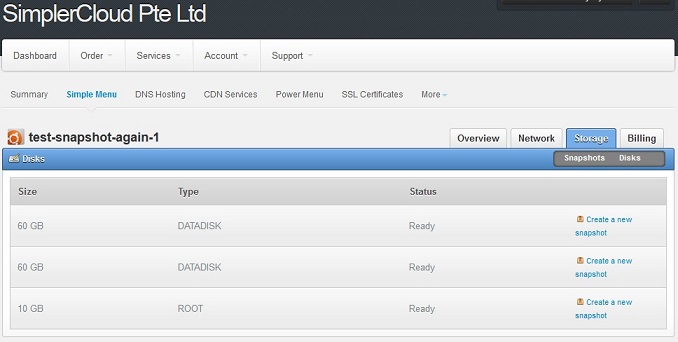
the hostname of your servelet, then choose Storage > Disks. You will
see the list of your disks (both your data-disk and root-disk).
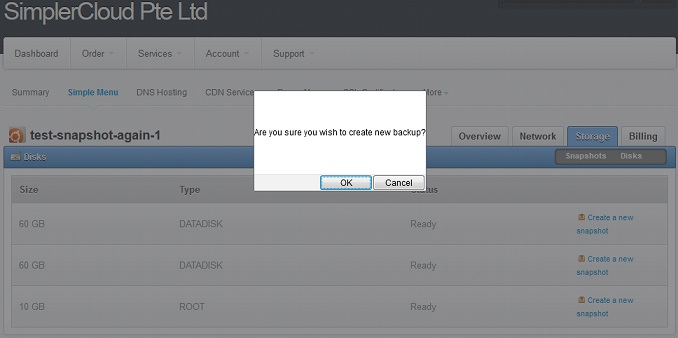
To make a snapshot of either the data-disk or the root-disk, click on
“Create a new snapshot” next to the disk. There will be a prompt: “Are
you sure you wish to create new backup?”, click “OK”.
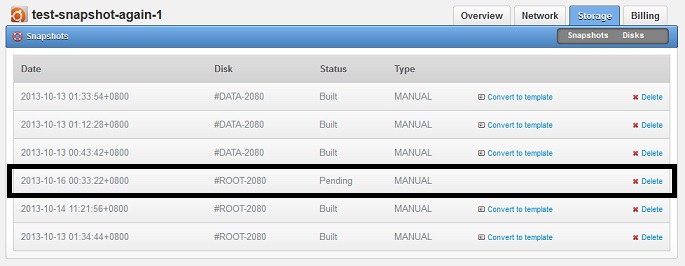
The window will then show the snapshot area of the storage section,
showing the list of your existing snapshots, including the one you are
creating. If this is the first time you have created a snapshot, then
you will only see the snapshot which you are creating, with the status
“Pending.”
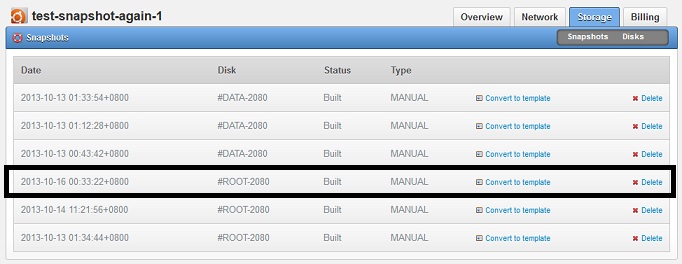
Snapshots will take some time, depending on the size of your disk.
Once snapshot is completed, the status of the snapshot will change to
“Built” instead of Pending.
How can you restore data from the snapshot backup?
If you want to recover any data from any of your snapshots, you will
need to open a support ticket with us, and let us know which snapshot
you would like to restore data from. Please kindly provide us with two
information:
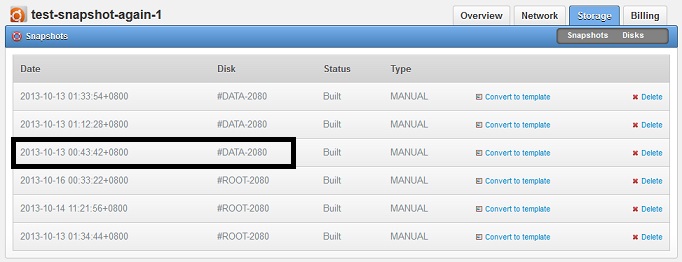
- The date when the snapshot was created (e.g. 2013-10-12 22:51:17+0800)
- The disk name (e.g. #DATA-2080)
You can find the above two information from your servelet control panel > Storage > Snapshots.
We will then convert the snapshot into a disk volume, and temporarily
attach the disk volume into your existing servelet, so that you can
copy the data over to your servelet. Once you have done with the
copying, we will detach back the temporary volume.
At the moment, the process has to be done manually. However, we are
looking into possibility of making this process automated for the
convenience of all our customers.
More information about our snapshot backup feature can be found on our knowledge base articles at this URL:
Yes, you heard right. CloudFlare’s CDN (Content Delivery Network)
services are now available for all customers in their Servelet control
panel. There are no installation fees, and with this new feature, you
can create, enable and manage your CloudFlare CDN directly through your
Servelet panel so that everything is conveniently centralized.
What is CloudFlare?
CloudFlare is a multi-award winning CDN (Content Delivery Network)
service which helps to accelerate and secure your websites hosted on
your servelets by providing caching and proxying service for your
websites. CloudFlare can help you to protect your websites from
malicious visitors, save your servelet’s bandwidth and reduce the
loading time of your websites.
CloudFlare also has multiple CDN nodes all around the globe, and the
nodes will keep a copy of your website’s cache. All your websites’
visitors will be redirected and served by the nearest CDN node, thus
increasing the speed and reducing the users’ website load time.
Once you have activated the CloudFlare CDN service for any of your
domains hosted in our name servers, our name servers will then make the
necessary changes to point your website’s domain (normally http://www.YOUR-DOMAIN)
to CloudFlare CDN network. At the same time, our control panel will
connect to CloudFlare CDN network’s API to register your account and
domain into the CDN network.
This allows CloudFlare to accelerate your website traffic, since all
requests to your website will be routed through CloudFlare CDN network.
CloudFlare’s advanced CDN technology will help to screen your website’s
traffic from malicious visitors, cache static content of your website
and optimise your web content.
What are the advantages of using CloudFlare CDN?
The advantages of using CloudFlare CDN:
Improve the overall performance of your website.
Protect your website from malicious threats.
Computer infection alert to visitors of your website.
Offline browsing mode of your website when your servelet is down.
Overall lower CPU usage of your servelet.
What are the caveats of CloudFlare CDN I need to take note of?
Some caveats and limitation of enabling CloudFlare CDN service for your website:
Your web statistics might not reflect the actual number of visitors
to your site, because some of the requests are handled by CloudFlare CDN
nodes and not handled by your web server directly.
Because CloudFlare CDN nodes cache static contents from your
website, any changes to your content might not be reflected immediately
when your visitors visit your page.
CloudFlare CDN service will only handle requests going to http://www.YOUR-DOMAIN, while requests going to [YOUR-DOMAIN] would normally still be handled by your web server.
CloudFlare CDN service (the free plan) doesn’t support SSL.
OK, I am very interested in trying the service. How do I sign up?
The CloudFlare CDN service works together with DNS Hosting service,
so you will need to use our DNS Hosting service (which is also free) for
the CloudFlare CDN service to work.
To order the CloudFlare CDN service, login to the customer portal
> Order > CDN Services. Choose “CloudFlare CDN” and then click
“Order Now!”
How do I configure the CloudFlare CDN service?
To manage the CloudFlare CDN service, login to the customer portal
and then go to Services > CDN Services > CloudFlare CDN. You will
see the CloudFlare CDN console panel.
Click on “Managed Websites”. You will see the list of domains which
are hosted in SimplerCloud’s name servers under “DNS Hosting service”.
If you do not subscribe to DNS Hosting service or you haven’t add any
domains under DNS hosting service, you will not see any domains listed
here.
To enable CloudFlare CDN service for a particular domain, just click
the grey cloud next to the domain name. Once the service is activated,
the cloud’s colour will change to orange.
What will happen to my domain once the CloudFlare CDN service is activated?
Once the CloudFlare CDN service is activated for your domain, the DNS
records for your domain will automatically be changed to point to the
CloudFlare CDN service’s IP address rather than the actual IP address of
your servelet.
Your website (e.g. http://www.YOUR-DOMAIN) will be served by CloudFlare CDN service rather than by your servelet directly.
Summary
Our control panel is now integrating our name servers (through our
DNS Hosting service) and CloudFlare CDN services (through CloudFlare
API), allowing you to enable CloudFlare CDN services for your websites
hosted on your servelets with just a click of a button (a cloud image,
to be exact). All the required processes: the creation of CloudFlare
account, registering of your domain names into your CloudFlare account
and enabling your domain name to use CloudFlare CDN services (by
changing the DNS records of the domain hosted in our name servers to
CloudFlare node IP addresses) are being done automatically in the
back-end. And furthermore, the service is provided for free to all our
customers.
So, what are you waiting for? Host your domain names in our name
servers and try the CloudFlare CDN services for your website, for free.
Good news for web-hosters!We have releasedservelettemplates forcPanel andPlesk. You can find them on the list of templates for plan M and above. With these templates, you will not need to install cPanel or Plesk manually yourselves. You can just select the templates (either CentOS+cPanel or Ubuntu+Plesk) and the control panel applications will be pre-installed for you, upon the provisioning of your servelets. You will just have to do the initial configuration, by accessing to the web interface of the control panels, for you to start using them, almost immediately! The templates are provided for free, for the convenience of all our customers. Take note that the templates come without licenses.
On top of that, you can alsobuy cPanel licenses from us. The price starts from $15.95 for cPanel/WHM VPS Optimized License, which is the most suitable license for your servelets. You will just need to provide the IP address and hostname of your cPanel servelet, and the license will be active immediately after you made your payment. It’s just that simple!
We are also currently in the midst of talking toParallelsfor us to start providing Plesk licenses for you, for the convenience of all our customers.
It has been very exciting days (and nights) for all of us here at SimplerCloud
in the past month. Building a top-notch and world-class,
built-from-the-ground cloud infrastructure is not easy, but we are very
happy that we are now coming to this stage that we are ready to roll-out
our services. We built SimplerCloud after realizing that there are no
Asian cloud computing providers who can provide a true automated and
100% self-manageable cloud servers with high-performing, fast SSD
servers and painless, instant deployment and on-the-fly scaling.
The main features of our services are our virtual machines (VM), which we call Servelets.
They are on-demand, scalable virtualized servers accessible over the
Internet. They are set up instantly, very easy to manage, and extremely
reliable. Those Servelets are deployed in real-time and will be ready
for use just minutes upon confirmation of the order. The most important
thing is that they are more affordable than anything found in the market
today.
And when we say it’s affordable, we really mean it. Our smallest XS Servelet plan
only costs US$10 a month, without any contract commitments. This comes
with 1 GB RAM, 20 GB blazing-fast SSD storage, 1 vCPU core and 1 TB of
data transfer. It will be very difficult to get that kind of price for a
cloud server, not only here in Singapore, but also in Asia.
Of course, our ability to bring the price down doesn’t sacrifice on
quality. We want to provide cloud services which are easy, instant and
reliable. All our servelets sit on very fast systems powered by SSD (solid-state) drives
in a distributed and scalable storage system on high performance 10Gbps
links. SSD uses integrated circuit assemblies as memory to store data
persistently, without any moving mechanical components, unlike
traditional hard drives. The result is a blazing fast I/O performance
for your servelets, 3-10 times normal hard drives.
In addition to our Servelets, we also provide additional services such as domain registrations and SSL certificate.
For domain registrations, we are currently providing TLD (top level
domain) registrations for .com, .org, .net, .biz, .info and .name,
starting from US$ 14.95 per month! More TLDs will be added soon,
including country-level ccTLDs such as .SG and .ID. We also provides
free DNS hosting for our customers. As for SSL certificate, we provide
basic and wildcard SSL certificates starting from just US$ 29.90 per
year.
All the above services can be ordered and managed through our simple and easy-to-use, multi-lingual control panel.
At the moment both our website and our control panel are in English and
Bahasa Indonesia, and more languages will be added soon. You can browse
all the services that we provide, order any of the services instantly
and start using those services almost immediately! Payment can be made
using Paypal or credit card. You can also manage all the services that
you have with us, console in to your Servelets, manage your domains and
more.
So, what are you waiting for? Please visit our website, create yourself an account on our customer portal (it’s free) and start jumping into the real cloud bandwagon.
The default libvirt version on Ubuntu 12.04 doesn’t support Ceph RBD as primary storage. I followed this instruction from Wido to get libvirt version 1.0.2, which can support RBD storage pool support. However, I had an issue whereby the libvirt is reporting wrong RBD storage pool’s disk usage / allocation information.
As a result, VM instance creation failed because the RBD storage pool is reported as having insufficient disk space and CloudStack wasn’t able to find a suitable /available storage pool.
2013-07-15 11:15:28,313 DEBUG [cloud.storage.StorageManagerImpl] (Job-Executor-3:job-168) Checking pool: 208 for volume allocation [Vol[227|vm=225|ROOT]], maxSize : 15828044742656, totalAllocatedSize : 1769538048, askingSize : 8589934592, allocated disable threshold: 0.85 2013-07-15 11:15:28,313 DEBUG [storage.allocator.AbstractStoragePoolAllocator] (Job-Executor-3:job-168) Checking if storage pool is suitable, name: sc-image ,poolId: 209 2013-07-15 11:15:28,313 DEBUG [storage.allocator.AbstractStoragePoolAllocator] (Job-Executor-3:job-168) Is localStorageAllocationNeeded? false 2013-07-15 11:15:28,313 DEBUG [storage.allocator.AbstractStoragePoolAllocator] (Job-Executor-3:job-168) Is storage pool shared? true 2013-07-15 11:15:28,317 DEBUG [cloud.storage.StorageManagerImpl] (Job-Executor-3:job-168) Checking pool 209 for storage, totalSize: 6013522722816, usedBytes: 38283921137336466, usedPct: 6366.305226067051, disable threshold: 0.85 2013-07-15 11:15:28,317 DEBUG [cloud.storage.StorageManagerImpl] (Job-Executor-3:job-168) Insufficient space on pool: 209 since its usage percentage: 6366.305226067051 has crossed the pool.storage.capacity.disablethreshold: 0.85 2013-07-15 11:15:28,317 DEBUG [storage.allocator.FirstFitStoragePoolAllocator] (Job-Executor-3:job-168) FirstFitStoragePoolAllocator returning 1 suitable storage pools 2013-07-15 11:15:28,317 DEBUG [cloud.deploy.FirstFitPlanner] (Job-Executor-3:job-168) Checking suitable pools for volume (Id, Type): (228,DATADISK) 2013-07-15 11:15:28,317 DEBUG [cloud.deploy.FirstFitPlanner] (Job-Executor-3:job-168) We need to allocate new storagepool for this volume 2013-07-15 11:15:28,319 DEBUG [cloud.deploy.FirstFitPlanner] (Job-Executor-3:job-168) Calling StoragePoolAllocators to find suitable pools 2013-07-15 11:15:28,319 DEBUG [storage.allocator.FirstFitStoragePoolAllocator] (Job-Executor-3:job-168) Looking for pools in dc: 6 pod:6 cluster:6 having tags:[rbd] 2013-07-15 11:15:28,322 DEBUG [storage.allocator.FirstFitStoragePoolAllocator] (Job-Executor-3:job-168) FirstFitStoragePoolAllocator has 1 pools to check for allocation 2013-07-15 11:15:28,322 DEBUG [storage.allocator.AbstractStoragePoolAllocator] (Job-Executor-3:job-168) Checking if storage pool is suitable, name: sc-image ,poolId: 209 2013-07-15 11:15:28,322 DEBUG [storage.allocator.AbstractStoragePoolAllocator] (Job-Executor-3:job-168) Is localStorageAllocationNeeded? false 2013-07-15 11:15:28,322 DEBUG [storage.allocator.AbstractStoragePoolAllocator] (Job-Executor-3:job-168) Is storage pool shared? true 2013-07-15 11:15:28,326 DEBUG [cloud.storage.StorageManagerImpl] (Job-Executor-3:job-168) Checking pool 209 for storage, totalSize: 6013522722816, usedBytes: 38283921137336466, usedPct: 6366.305226067051, disable threshold: 0.85 2013-07-15 11:15:28,326 DEBUG [cloud.storage.StorageManagerImpl] (Job-Executor-3:job-168) Insufficient space on pool: 209 since its usage percentage: 6366.305226067051 has crossed the pool.storage.capacity.disablethreshold: 0.85 2013-07-15 11:15:28,326 DEBUG [storage.allocator.FirstFitStoragePoolAllocator] (Job-Executor-3:job-168) FirstFitStoragePoolAllocator returning 0 suitable storage pools 2013-07-15 11:15:28,326 DEBUG [cloud.deploy.FirstFitPlanner] (Job-Executor-3:job-168) No suitable pools found for volume: Vol[228|vm=225|DATADISK] under cluster: 6 2013-07-15 11:15:28,326 DEBUG [cloud.deploy.FirstFitPlanner] (Job-Executor-3:job-168) No suitable pools found 2013-07-15 11:15:28,326 DEBUG [cloud.deploy.FirstFitPlanner] (Job-Executor-3:job-168) No suitable storagePools found under this Cluster: 6 2013-07-15 11:15:28,326 DEBUG [cloud.deploy.FirstFitPlanner] (Job-Executor-3:job-168) Could not find suitable Deployment Destination for this VM under any clusters, returning. 2013-07-15 11:15:28,332 DEBUG [cloud.vm.UserVmManagerImpl] (Job-Executor-3:job-168) Destroying vm VM[User|Indra-Test-3] as it failed to create on Host with Id:null 2013-07-15 11:15:28,498 DEBUG [cloud.capacity.CapacityManagerImpl] (Job-Executor-3:job-168) VM state transitted from :Stopped to Error with event: OperationFailedToErrorvm's original host id: null new host id: null host id before state transition: null 2013-07-15 11:15:29,125 INFO [user.vm.DeployVMCmd] (Job-Executor-3:job-168) com.cloud.exception.InsufficientServerCapacityException: Unable to create a deployment for VM[User|Indra-Test-3]Scope=interface com.cloud.dc.DataCenter; id=6
After consulting the CloudStack users’ mailing list and logging a bug report on Apache’s JIRAhere without any success, I managed to resolve the problem by compiling and installing the latest version of libvirt. This is how I did it on my KVM hypervisor hosts running on Ubuntu 12.04.2 LTS servers:
1. Download the latest libvirt version (1.1.0) from libvirt’s FTP site, and extract it:
Last month, I attended APRICOT 2013 in Singapore. It has been a long time since I attended APRICOT or any other APNIC events. The last time I attended APRICOT was in 2010 when it was held in Kuala Lumpur, Malaysia. Therefore, it was nice to meet some old and new friends during the event.
As usual, I attended only the conference and not the workshop. Some of the interesting topics discussed during the conference were:
Software-Defined Networking (SDN), which is an approach to provision network connections on-the-fly, normally within cloud computing and virtualisation environment;
DNSSEC, in a bid to secure the DNS (Domain Name System); and
Last but not least, IPv4exhaustion and the (very slow) deployment of IPv6.
This weekend, I will be going to Jakarta, Indonesia to attend Traceroute Party. This is one of the biggest gathering events related to the (very big) Indonesian Internet community, with telcos, NAPs, ISPs, content providers, game providers, Internet communities, bloggers and the Internet users in general, are expected to attend. There will be 300 exhibitors, talk-shows, workshops and last but not least, many indie bands performing live. This even is hosted by IDC Indonesia.
I will make use of the opportunity to hang around and get together with some old friends, and make some new friends as well. Some of my friends from the Indonesian ISP and Internet industry are expected to be there. I hope to meet some of my old friends during the RADNET era. Most of my friends in BemoNet community will also be there, since BemoNet has 3 booths at the event, and we don’t have any idea on how to make use of the booths. ;P I will also make the opportunity to meet some friends from the RKTI and BlogFam communities as well.
Earlier this morning, I received a call from StarHub customer service. He told be that he can reduce my StarHub monthly bill by $12 for the next one year, and at the same time, he will be giving me 12 months free HBO-pak channels such as HBO itself, HBO Signature, HBO Family, etc. The only catch is that I would need to recontract my StarHub subscription for one year.
I remember that I haven't recontracted my StarHub subscription for years. Since I only subscribe to StarHub only for their cable TV services -- I don't subscribe to their broadband or mobile services --, I don't think it's necessary for me to commit myself into any contract. But since their customer service took the initiative to call me to offer such discount and free perks which comes with the recontract option, then I think, why not? :)
The customer service said that my HBO channels will be activated within 5 working days, while the contract will start on the next billing cycle. Can't wait. :)
As I have mentioned on my tweet earlier, I have got myself a new phone. And you know what, I got my phone upgraded for free. Really. :)
Since I’m a SingTel’s mio Home user, I am eligible for re-contract every one year. And this month is exactly one year since I re-contracted my line for me to get my SamsungGalaxy S II phone last year. I checked SingTelShop’s website and with my current 3G Flexi Value plan, I can get the new Samsung Galaxy S III phone for $348. Furthermore, with SingTel UOB credit card promotion, I can get $50 off the handset price, so the price of the phone reduces to just $298, or approximately 2.2 million rupiah.
Lastly, I traded-in my old Samsung Galaxy S II phone and fortunately, SingTel’s trade-in value for my old phone is quite high, $300. Therefore, I don’t need to pay a single cent for this upgrade. :)
There are two colours available for Samsung Galaxy S III, and I chose the pebble blue. I’ve checked some stores which sell the phone without contract, and for some reason, the blue Galaxy S III is more expensive than the white one. Not too sure why. I suspect that many people prefers the blue one rather than the white one, causing the demand for the blue one is higher, thus pushing the price slightly higher.
Apologise for the low quality of the picture above, I took it using my Blackberry Bold 9900 phone, which you might have known, its camera is not really that good. Of course, I cannot take a picture of the phone using the phone itself, can I? :)
My verdict after using this new phone for a couple of days: I feel that its CPU processes faster than my older Galaxy S II. Applications such as Seesmic, Facebook and Instagram runs faster on the phone, thanks to its quad-core 1.4 GHz CPU, which is much better than S II’s dual-core 1.2 GHz CPU. I also appreciate its bigger display, it’s a 4.8-inch display compared to S II’s 4.3-inch. Furthermore, the resolution is much better, 720 x 1280 pixels compared to S II’s 480 x 800 pixels.
Compared to my older S II, I think that the S III has a slightly longer battery life. But it could also be because it’s new, so I cannot compare apple-to-apple with my 1-year old S II. Some people have pointed out that the S III might have a software bug draining its battery, but so far I don’t see it happening on my phone.
I also love the bahasa Indonesia dictionary. I can type faster using its swype function with ease in Indonesian. Its notification functions are also much better. And having this new phone allows me to have 50 GB of space in my Dropbox account. There are also many new features which I didn’t have it on the earlier Samsung Galaxy S II.
Basically, upgrading my phone from my older S II to the new S III is a good choice. Especially since I can have it for free. :)
From what I understand, Yahoo! is a sinking ship, and as part of the new CEOScott Thompson’s strategy to keep the ship afloat, Yahoo! is axing about 2,000 of its staff globally. Yahoo! Indonesia is no exception, and unfortunately Koprol’s development team has been included on the list. It beats me though, on why the whole team had to be disbanded ahead of its planned launch of the supposedly new Koprol 2.0 engine in May.
The big question now is what will be Koprol’s fate. Will the social media platform be closed? As Aulia of Daily Social has pointed out, Koprol has a strong users base in Indonesia, and when the news of possible imminent shutdown has spread out, many of its users voiced out (with special hashtag: #saveKoprol) that the platform should not be closed.
I have to admit that I have not been using Koprol for quite some time. As a location-based social media platform, it is losing out to Foursquare especially for my case here in Singapore. However, Koprol is purely made in Indonesia and by Indonesians, therefore as fellow Indonesians, we should be proud of Koprol.
I met some friends, such as Ryan, Nunil and Ari, through Koprol. I met Leo and Smitty, in person, through a Koprol gathering here in Singapore. KCR, Koprol’s community radio, inspired me to setup Radio Komunitas Twitter Indonesia (RKTI). Therefore, like it or not, I have some fond memories in Koprol.
Let’s ask Yahoo! not to close down Koprol. If Yahoo! doesn’t want to run Koprol anymore, then may be Koprol founders can request to take over back Koprol and keep on running the social media platform outside Yahoo? I’m not too sure on whether it’s possible, since I understand that Yahoo! has spent quite a lot of money to acquire Koprol way back in May 2010.